
concept · printing-infrastructure
What Is a Local Printing Runtime?
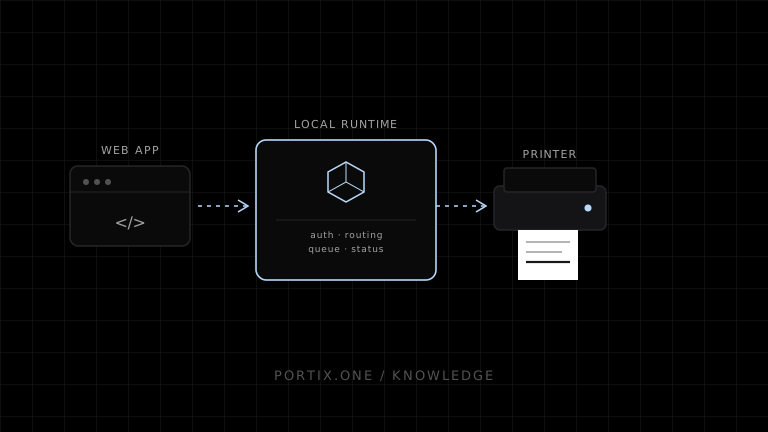
Quick answer
A local printing runtime receives authenticated jobs from an approved application, validates them, maps logical printer roles to installed or reachable devices, and submits data through an operating-system queue or a supported direct transport. It is useful for POS, labels, kiosks, and operations where window.print() is too interactive or lacks device control. Because it connects remote content to local hardware, it must enforce pairing, origin validation, least privilege, limits, auditability, and secure updates.
A local printing runtime is trusted software installed on or near a user’s workstation that bridges a web application and local printing resources. It can expose controlled capabilities that standard browser printing does not provide, including automatic printer routing, raw command delivery, queue status, retries, and silent printing after authorization.
Where the runtime sits
Web application
      ↓ authenticated local protocol
Local printing runtime
  ├─ identity and authorization
  ├─ printer discovery and mapping
  ├─ rendering or raw encoding
  ├─ queue, retry, and status
  └─ audit and diagnostics
      ↓
OS print queue or supported device transport
      ↓
Printer
The runtime is an application-level bridge. It does not replace every spooler, driver, network, or device function; it coordinates the path appropriate to each printer profile.
Core responsibilities
- Pair a user, browser, tenant, or terminal explicitly.
- Authenticate requests and validate the requesting origin.
- Authorize document types, printer roles, and hardware actions.
- Discover or accept configured printers without exposing arbitrary devices.
- Transform a job into HTML/PDF, driver input, raster data, or raw commands.
- Submit through the platform spooler or a supported direct connection.
- Track job identity, status, timeout, retry, and cancellation.
- Report actionable errors without claiming more than the lower layer knows.
- Update securely and revoke old pairings.
Browser printing vs local runtime
| Capability | window.print() | Local runtime |
|---|---|---|
| User print dialog | Normal | Optional after trusted setup |
| Automatic printer mapping | No general page API | Yes, by policy |
| Raw ESC/POS or ZPL | No | Possible with supported adapter |
| Cutter or drawer | No general API | Possible with authorization |
| Queue status | Not exposed | Can expose controlled status |
| Installation | None | Required |
| Security boundary | Browser and user | Runtime must implement it |
Use the browser workflow when a person can confirm each job. Add a runtime only when operational requirements justify its lifecycle and security cost.
Job contract
A stable runtime API should receive intent, not an arbitrary local command:
{
  "jobId": "sale-8472-receipt-v1",
  "printerRole": "customer-receipt",
  "documentType": "receipt",
  "format": "escpos",
  "payload": "...",
  "options": { "cut": true }
}
The example is conceptual. Production contracts should version schemas, bound all fields, avoid secrets, separate dangerous actions, and define idempotency.
Security requirements
“Localhost” is a network location, not proof of identity. A runtime should require:
- Explicit pairing with expiration and revocation.
- Origin and application identity checks.
- Short-lived authenticated requests.
- Per-printer and per-capability authorization.
- Payload schema, type, and size validation.
- Rate limits and duplicate protection.
- Secure transport appropriate to the deployment.
- Signed updates and protected configuration.
- Audit metadata without storing sensitive document bodies by default.
Reliability model
Define observable states such as accepted, queued, sent, device-reported, failed, and unknown. A runtime should not translate “socket write completed” into “receipt printed.” Preserve the original job ID across safe retries and make explicit reprints distinguishable.
Deployment choices
| Model | Best fit | Tradeoff |
|---|---|---|
| Per-workstation runtime | USB and workstation-owned printers | Install and update every terminal |
| Shared local gateway | Several terminals and network printers | Gateway availability and access control |
| Native desktop shell | Web UI packaged with device access | Platform distribution and app lifecycle |
| Managed cloud print service | Central routing across sites | Internet dependency, privacy, recurring operations |
Common mistakes
- Trusting any origin that can reach the listening port.
- Allowing arbitrary printer names, file paths, or raw commands.
- Retrying unknown outcomes without idempotency.
- Coupling printer discovery to business routing.
- Logging complete receipts or labels unnecessarily.
- Updating the web app without compatibility negotiation with older runtimes.
- Treating runtime connectivity as printer readiness.
Frequently asked questions
Is a local runtime a printer driver?
No. It may call drivers or bypass them with supported raw protocols, but it owns application authorization, routing, and job coordination.
Does it require internet access?
Not necessarily. Local job execution can be offline if identity, policy, templates, and printer mappings support it.
Can it enable silent printing?
Yes, after explicit trusted configuration and within authorized scope. Silent does not mean unauthenticated.
Should the browser discover every printer?
Usually no. Expose approved logical roles and safe metadata rather than the complete local device surface.
References
- HTML Standard — Printing — WHATWG, accessed Jul 19, 2026
- Introduction to Printing — Microsoft Learn, accessed Jul 19, 2026
- Writing WebSocket Client Applications — MDN, accessed Jul 19, 2026
Related content
concept
What Are Print Drivers?
Learn how print drivers expose printer capabilities, convert application output into device-ready data, and affect layout, compatibility, performance, and security.
concept
What Is a Print Queue?
Learn how print queues organize jobs, destinations, states, priorities, retries, and operator actions—and how a queue differs from a spooler.
concept
What Is a Print Spooler?
Learn how a print spooler accepts, stores, schedules, processes, and sends print jobs—and how to diagnose spooler failures safely.
concept
What Is Raw Printing?
Learn how raw printing sends printer-ready bytes such as ESC/POS, ZPL, PCL, or PostScript without normal document rendering.
concept
What Is Silent Printing?
Learn what silent printing means, why normal browsers require confirmation, and how trusted kiosks, local runtimes, native apps, and managed services enable it safely.
concept
What Is WebSocket Printing?
Learn how a browser uses a persistent WebSocket connection to a trusted local or remote printing service for jobs, status, reconnects, and acknowledgments.