
concept · thermal-printing
What Is a Thermal Printer?
Quick answer
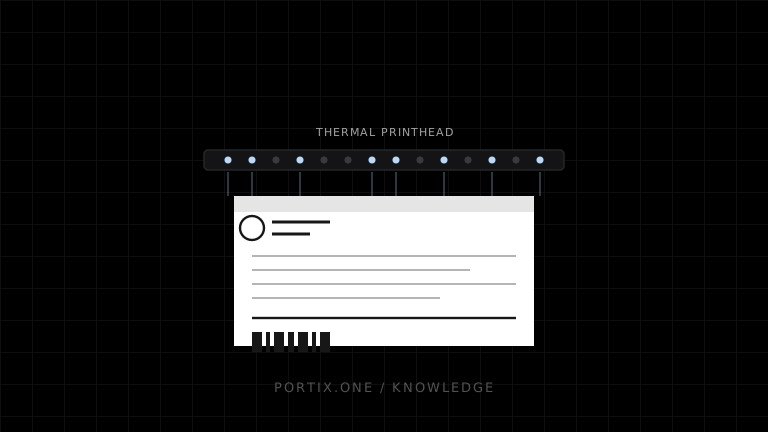
A thermal printer creates an image with a row of tiny heating elements. Direct thermal printers darken specially coated paper or labels and require no ribbon. Thermal transfer printers heat a coated ribbon and transfer its material onto paper or synthetic media. Thermal printing is common for receipts, shipping labels, barcode labels, tickets, and wristbands because it supports fast, compact, on-demand output.
A thermal printer uses controlled heat from a printhead to create text, graphics, or barcodes. Unlike inkjet and laser printers, thermal printers do not use liquid ink or toner. They either activate heat-sensitive media directly or melt material from a ribbon onto the print surface.
How a thermal printer works
Application creates text, graphics, or barcode data
                         ↓
Printer rasterizes content into rows of dots
                         ↓
Thermal printhead heats selected elements
                         ↓
Media moves under printhead and platen roller
                         ↓
Heat activates paper or transfers ribbon material
                         ↓
Printed receipt, label, ticket, or tag
The printhead contains a line of individually controlled heating elements. As media advances, the printer energizes selected elements to form rows of dots. Resolution, commonly stated in dots per inch (dpi), determines the available dot grid; media, heat, speed, pressure, and maintenance influence the usable result.
The two thermal printing methods
Direct thermal
Direct thermal media has a heat-sensitive coating that changes color under the printhead. The printer needs no ink, toner, or ribbon, which simplifies loading and reduces consumable types.
The tradeoff is the media itself: heat, light, abrasion, chemicals, and storage conditions can darken or fade it. Direct thermal is well suited to receipts and labels whose required life matches the selected media and environment.
Thermal transfer
Thermal transfer places a coated ribbon between printhead and media. Heat releases wax, resin, or a wax-resin formulation from the ribbon onto the surface. The ribbon and label material must be compatible.
This method supports paper and synthetic materials and is generally selected when the mark needs greater durability or environmental resistance. It adds ribbon inventory, loading, disposal, and matching requirements.
Common thermal printer types
| Type | Typical use | Common characteristics |
|---|---|---|
| Receipt printer | Checkout receipts, kitchen tickets | Roll paper, narrow width, fast feed, often an autocutter |
| Desktop label printer | Shipping, inventory, office labels | Compact, moderate volume, gap or mark sensing |
| Mobile printer | Delivery, field service, bedside labels | Battery powered, wireless, portable |
| Industrial label printer | Warehouses and production | Larger media capacity, durable enclosure, higher duty cycle |
| Print engine | Automated print-and-apply systems | Embedded in machinery, remote control and applicator integration |
These categories describe form and workload. A label printer may support direct thermal, thermal transfer, or both.
What thermal printers print
- Human-readable text and numbers.
- One-dimensional and two-dimensional barcodes.
- Logos and monochrome graphics.
- Receipts and order tickets.
- Shipping, inventory, asset, product, and compliance labels.
- Wristbands, admission tickets, and tags.
Most thermal devices are optimized for monochrome, variable data rather than photo printing. Some media or ribbon systems add limited spot color, but they are not equivalent to a general full-color printer.
Advantages
- Fast on-demand output with little drying time.
- Compact mechanisms suitable for counters and mobile workflows.
- Crisp edges useful for machine-readable symbols when correctly configured.
- Direct thermal requires few consumable types.
- Thermal transfer supports durable marks on varied media.
- Fewer moving print-mechanism parts than impact technologies.
Limitations
- Direct thermal output can be sensitive to heat, light, abrasion, and chemicals.
- Thermal transfer requires compatible ribbon and media.
- Printheads are wear items and can develop missing-dot lines.
- Incorrect darkness or speed can reduce barcode quality or printhead life.
- Narrow media and fixed dot grids constrain layout.
- Adhesive residue, dust, and poor cleaning can degrade output.
- Device language, connectivity, driver, and command support vary by model.
Choosing a thermal printer
Start with the application rather than speed alone:
- Define the document: receipt, label, wristband, ticket, or tag.
- Define its required readable life and exposure to heat, sunlight, moisture, abrasion, and chemicals.
- Select direct thermal or thermal transfer.
- Determine media width, material, adhesive, roll size, and sensing method.
- Choose resolution based on smallest text and barcode dimensions.
- Validate connectivity, printer language, cutters, peelers, rewinders, and other required hardware.
- Test real media under real storage, application, and scanning conditions.
Thermal printers in web applications
A web application can print a rendered page through the browser, but standard browser printing does not expose raw device commands or automatic printer selection. Receipt and label workflows that require silent routing, exact device-native output, a cutter, or status usually add a trusted local runtime, managed print service, native application, or controlled kiosk configuration.
The printer technology and the application-to-printer integration are separate decisions. A good thermal printer cannot compensate for an unreliable job-routing architecture.
Frequently asked questions
Does a thermal printer use ink?
Direct thermal uses heat-sensitive media and no ribbon. Thermal transfer uses a coated ribbon rather than liquid ink or toner.
Are all receipt printers thermal?
No, although direct thermal is common. Impact receipt printers still exist where multipart forms or environmental conditions justify them.
Do thermal prints fade?
Direct thermal output can fade or darken depending on its coating and exposure. Thermal transfer durability depends on the ribbon, substrate, and environment.
Is higher dpi always better?
No. Higher resolution helps small symbols and text, but speed, cost, media, artwork, and required barcode dimensions also matter.
Can a thermal printer print color?
Most common receipt and label models produce monochrome output. Specialized media, ribbons, or devices may support limited color.
References
- What Is a Thermal Printer? — Zebra Technologies, accessed Jul 18, 2026
- Direct Thermal vs. Thermal Transfer — Zebra Technologies, accessed Jul 18, 2026
- GS1 2D Barcode Playbook for Creation and Printing — GS1, accessed Jul 18, 2026
Related content
concept
Direct Thermal vs. Thermal Transfer Printing
Compare direct thermal and thermal transfer printing by durability, consumables, media, maintenance, cost, and use case.
concept
Label Printers Explained
Learn how label printers handle media, sensing, resolution, barcodes, ribbons, adhesives, and software for shipping, inventory, product, and asset labels.
concept
POS Printing Basics
Learn the essential components of point-of-sale printing, from receipt data and rendering to printer routing, ESC/POS commands, queues, cutters, drawers, and recovery.
concept
Receipt Printers Explained
Learn how receipt printers work, the differences between thermal and impact models, and how paper, cutters, connectivity, commands, and software affect POS printing.